
Rental & hire
Rent equipment out
Enquiry, quote, booking, handover, return and invoice for generators, plant, trucks, trailers and cars, billed by the day, week or month.
For rental fleetsRentalService & repairEngine rebuild
FleetAsset360 runs equipment rental, service and engine-rebuild companies on one record, from the first enquiry to the approved invoice: handovers, meters, job cards with parts, your country's tax, and what every asset really earns.
Try the live demoFrom £139 a monthMonthly or yearly plans
01Who it is for
Whether you rent it out, keep it running or rebuild it, the work is the same chain of handovers. FleetAsset360 puts that chain on one record.
Rental & hire
Enquiry, quote, booking, handover, return and invoice for generators, plant, trucks, trailers and cars, billed by the day, week or month.
For rental fleets
Service & repair
Services raised at the interval, breakdowns logged, job cards with parts and technician visits, and the cost on the asset that caused it.
Service and job cards
Engine rebuild
The Engine Rebuild Center moves every unit through its stages and bays, with photos, forecasts and a tracker link for the customer.
Engine Rebuild CenterFleets it fitsGeneratorsPlant & excavatorsTrucks & trailersCars & vansMixed fleets
02One system
One record follows the hire all the way through, so nothing falls between the office, the yard, the workshop and finance.
Customer, asset type, dates and site, logged by sales.
Priced by the day, week or month, with a minimum hire and a daily allowance.
The quote becomes a contract with its rate and allowance.
A pre-dispatch inspection, then a handover the customer signs.
Meter readings in hours, km or miles, typed in or pasted from Excel.
Job cards raised at the service interval, with parts. The supervisor approves.
Checked back in at the gate, ready for its next hire.
Hire, extra use and tax on one invoice. Finance approves; credit control follows it.
03Meters and extra use
Every contract has an allowance: hours a day, kilometres or miles. Each reading is checked against it, so anything over lands on the invoice instead of being forgotten.
04Product tour
Five real screens from the app, as they look on a phone. The same screens open full-width on a desktop.
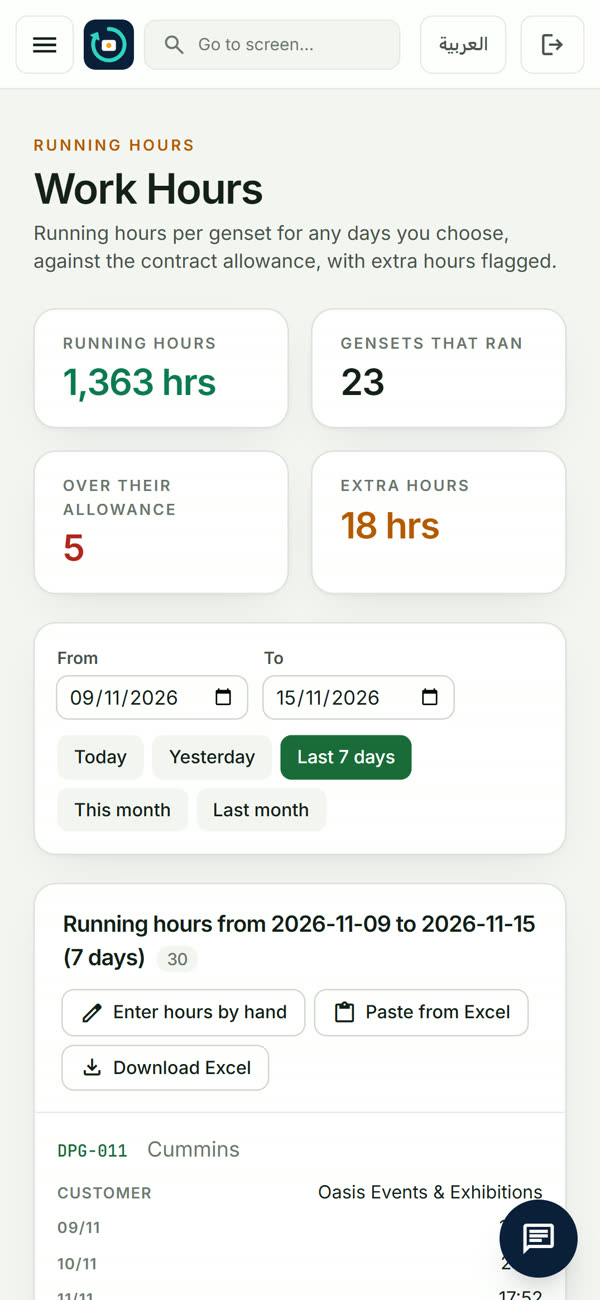
Enter readings per asset per day, or paste a month from Excel. FleetAsset360 compares them with each contract's daily allowance and shows the extra hours to bill, by customer or by asset.
A real screen from the FleetAsset360 app.
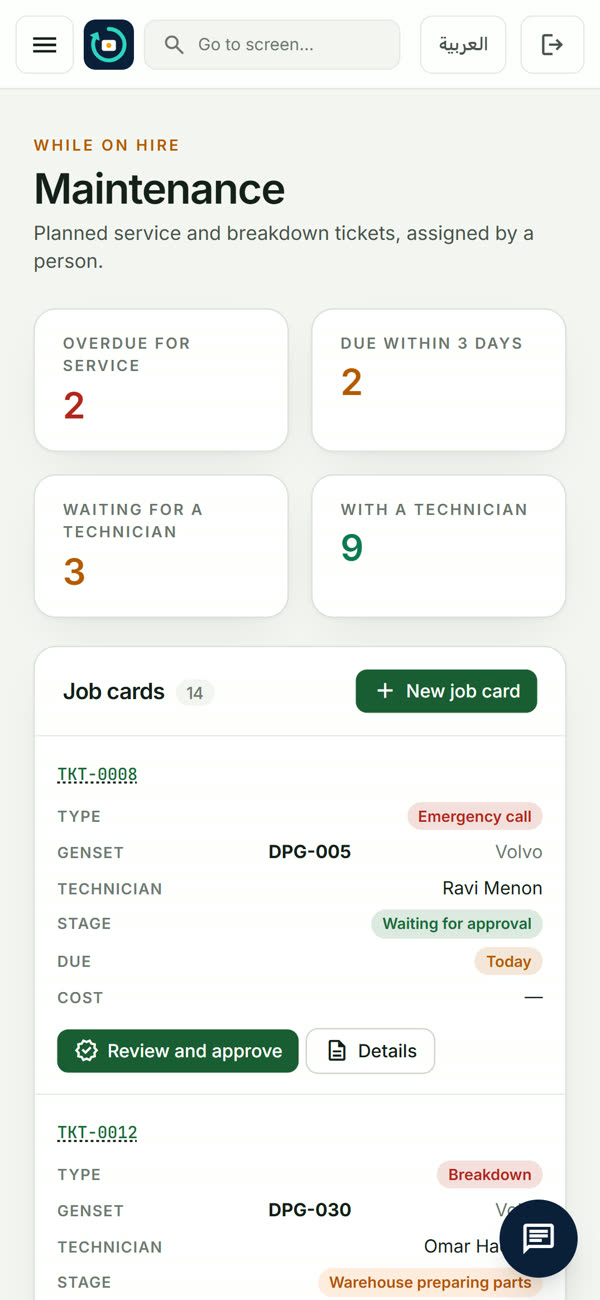
When an asset nears its service interval, a job card raises itself with the parts list from the last service. Overdue and due-soon work is on one screen.
A real screen from the FleetAsset360 app.
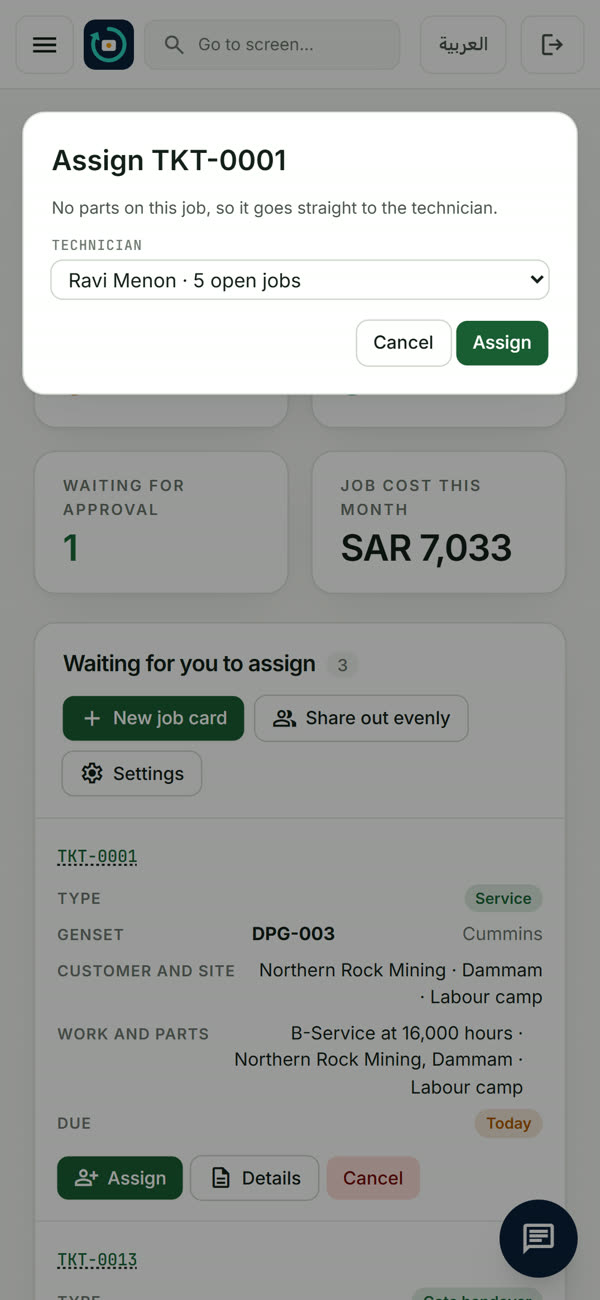
The supervisor assigns each job card to a technician; the warehouse is told what to prepare and verifies every part issued and returned.
A real screen from the FleetAsset360 app.
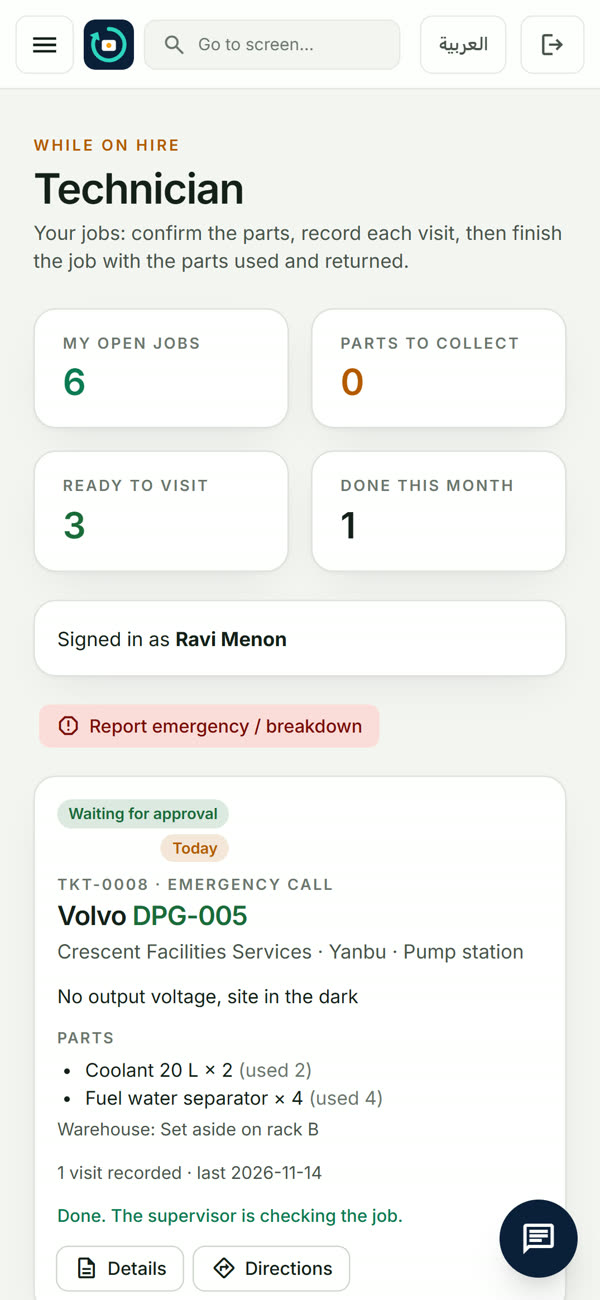
Technicians see only their own jobs, without prices. They confirm the parts, record each visit with times, readings and pictures, and finish the job on site.
A real screen from the FleetAsset360 app.
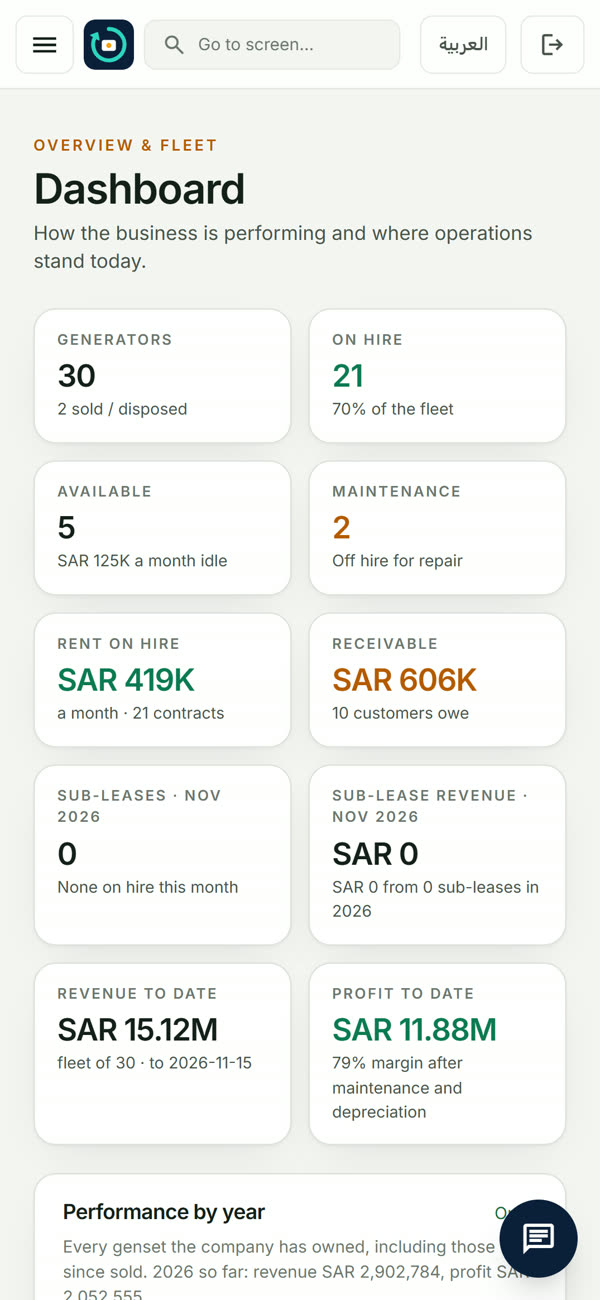
Assets on hire, available and in the workshop, rent on hire, what customers owe, revenue and profit to date, for the owner and finance.
A real screen from the FleetAsset360 app.
05Engine Rebuild Center Elite plan
For workshops that overhaul engines, generators and components. Each unit is received, moved through a stage template and handed back, with photos at the stages that need them and a date the customer can follow.
06Money and tax
Hire, extra use and tax come together on one invoice. Pick your country once; finance approves each invoice before it reaches receivables.
VAT. One VAT rate for your country, set once and carried on every invoice.
India GST. CGST and SGST for a customer in your own state, IGST for a customer in another.
US sales tax. Sales tax shown as its own line on the invoice.
Saudi ZATCA. Tax invoices with the ZATCA QR code, and reporting and clearance through FATOORA with each company's own certificates.
07Roles and approvals
Six roles, each signing in with their own account. Money moves only when the right person signs, and every step is in the audit log by name.
| Role | Works on | Signs off |
|---|---|---|
| Admin | The whole fleet, the team and their roles, the plan and the settings. | — |
| Finance | Invoices, tax, receivables, credit limits and holds, profit per asset. | Approves invoices and credit notes |
| Sales | Customers, enquiries, quotes and contracts. | — |
| Supervisor | Assigns job cards and sees what comes back from the field. | Approves job cards: time, travel and extra costs |
| Technician | Only their own jobs, without prices: parts, visits, readings and pictures. | — |
| Warehouse | Parts prepared, issued and checked back in for every job. | Verifies every part issued and returned |
08Mobile
Technicians see only their own jobs, without prices. They confirm the parts, record each visit with times, readings and pictures, and finish the job on site. Supervisors assign and approve on the move.
09Pricing
Pay monthly or yearly. Change or cancel any time. Every plan has unlimited assets and the Android app.
Prices exclude VAT/sales tax. Compare the plans in full
10FAQ
Plans, data, taxes and the app. See every question or ask us.
Companies that rent out, service or rebuild equipment: generators, plant and excavators, trucks and trailers, cars and vans, light towers, or a mix, and workshops that overhaul engines. If your assets work on someone else's site and you bill for the time they run, it fits.
Choose a plan, monthly or yearly, and sign up with your company details; then invite your team, each with their own role. Want to look around first? Try the live demo, or book a demo with us.
Invoices carry the tax of your country: VAT, GST or sales tax. For Saudi Arabia, tax invoices carry the ZATCA QR code and can be reported and cleared through FATOORA.
A part of the Elite plan for workshops that overhaul engines, generators and components. Each unit moves through a stage template with forecast days, on a rebuild board and a bay board, with stage photos, a technician time clock and a tracker link the customer can follow.
Yes, on the Pro and Elite plans. You invite a customer's people to the customer portal; they sign in with a password and a one-time code and see only their own issued invoices and credit notes. On Elite they also follow their rebuild jobs and approve rebuild quotes there.
Yes, at any time: a full download from the API & Access screen. On the Elite plan, also read-only API keys for your own systems.
Yes. Technicians record visits, readings and pictures on site; supervisors assign and approve; owners see hours and extra hours. The Android app is on Google Play; on iPhone it installs from Safari to the home screen while the App Store release is prepared. See the Mobile apps page.
From £139 a month · Monthly or yearly plans · Change or cancel any time